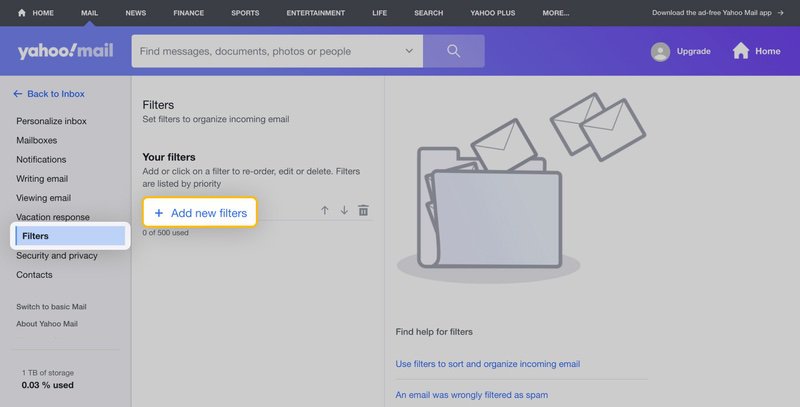
Yahoo Mail filters organize newly arriving messages into folders. They are useful for receipts or recurring work mail, but they do not replace Yahoo’s spam protection. This guide covers New Yahoo Mail on desktop web, with an older-desktop path noted separately.
Create one clear rule
- In New Yahoo Mail, open the More options menu below the folders and select Settings.
- Open Filters and choose Add new filters.
- Name the rule, choose its conditions and select or create the destination folder.
- Save it, then check what happens to a new matching message.
In the older desktop experience, the settings entry is Settings followed by More Settings. Use the path for the interface actually shown in your account.
Choose conditions that reflect your intention
For example, a rule for a known billing sender can put future receipts in a Receipts folder. Combining that sender with an exact subject condition makes the rule more selective. Yahoo uses all conditions in a rule; adding an unnecessary condition can prevent a match. Start with the smallest rule that identifies the messages you want, then refine it after checking real results.
Do not send broadly matched mail to Trash until you understand what the rule catches. Move messages to a review folder first if you are uncertain. This makes a mistaken match easier to spot.
Check order and existing mail
Rules are processed from the top of the list. When two filters match a message, the higher one takes priority. Select a filter and use the ordering arrows to put a specific rule above a broad one. To change a rule, select it, edit its conditions or folder and save. To remove it, select it and use the delete control.
New filters do not reorganize old mail. Move existing messages separately. If a message never reached the intended folder, check Spam first because Yahoo’s spam handling runs before your personal filters.
When another email app is involved
A POP client downloads Inbox mail; routing mail into another folder can make it appear absent from that client. Yahoo also documents limits for third-party mailboxes brought in through IMAP. Check the message directly in Yahoo webmail before assuming it has been deleted.
If messages repeatedly go to the wrong folder, review every applicable rule and any other app configured to remove mail from the server. Avoid deleting messages or resetting the entire mailbox while you are still identifying the rule responsible.
Source review: 12 October 2026. Prepared by Number Customer Care Editorial Desk from the official documentation below. Menu labels and feature availability can vary by account, region and app version.
Official sources
- Create and manage filters in New Yahoo Mail
- Fix New Yahoo Mail filter problems
- Filters in the older Yahoo desktop interface
Number Customer Care is an independent information website and is not affiliated with the companies mentioned. We cannot access, recover or change your account. Use the provider’s own website for account-specific assistance.